
AI Viral Video Automation — n8n Workflow
Turn a simple content idea into an AI-generated short-form video and distribute it across your social media channels with an automated n8n workflow.
This workflow connects AI video generation, image enhancement, caption generation, content tracking, and multi-platform publishing into one automated pipeline.
Instead of manually moving between different tools to create, edit, caption, track, and publish your videos, you can automate the process and spend more time focusing on your content strategy.
What This Workflow Does
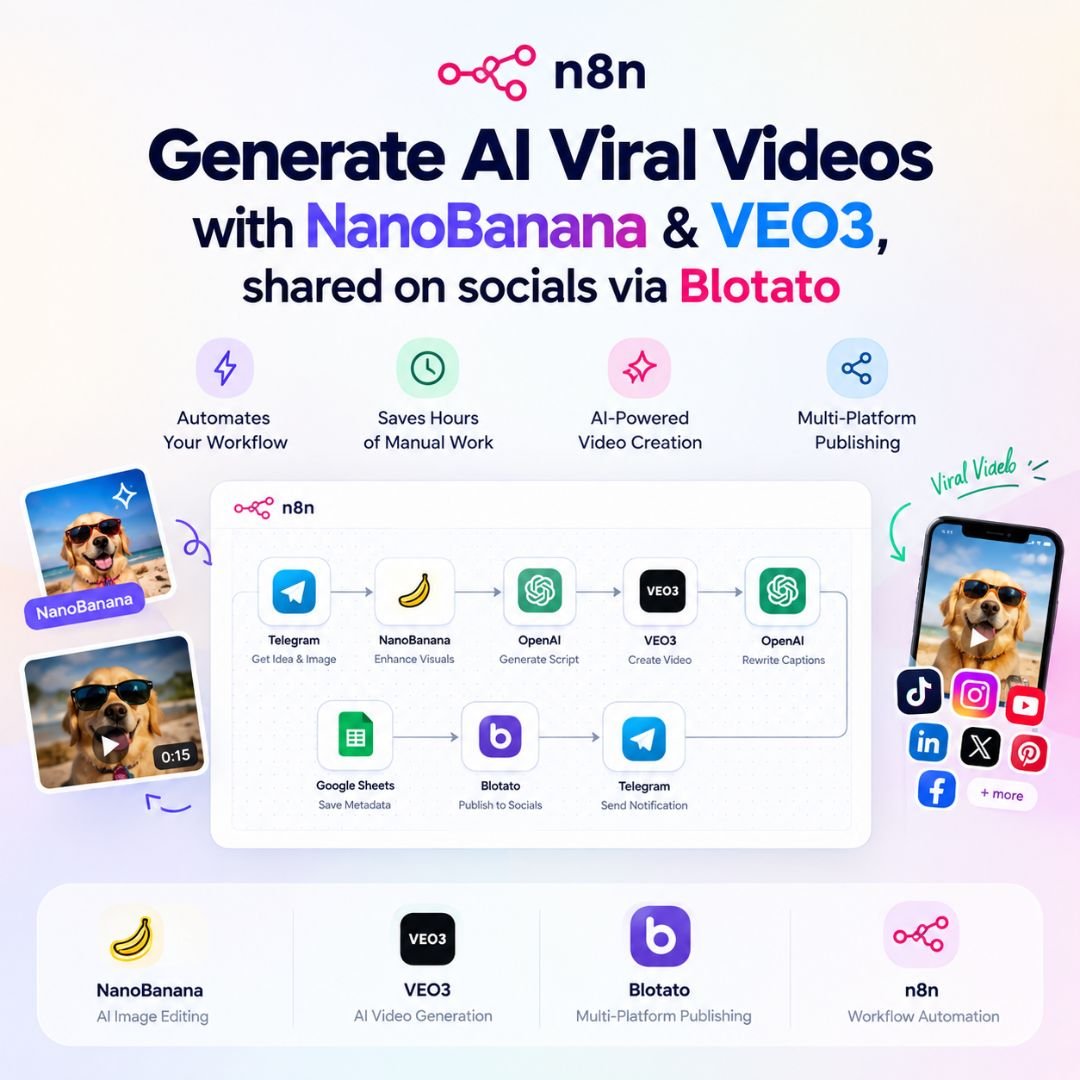
The workflow creates an automated pipeline from idea → AI-enhanced visuals → video generation → captions → social publishing.
1. Collect Your Content Idea
Send your content idea and image through Telegram to start the workflow.
2. Enhance Your Visuals
Use NanoBanana to enhance or transform your input visuals for use in your video.
3. Generate the Video Script
The workflow uses AI to turn your idea into a structured video script and generation prompt.
4. Create the Video
Send the generated prompt and visuals to VEO3 to create the final AI-generated video.
5. Generate Social Captions
AI automatically creates short, engaging captions that can be adapted for social media publishing.
6. Track Your Content
Important video information and metadata can be stored in Google Sheets, making it easier to manage your content library.
7. Publish Across Social Platforms
Using Blotato, the workflow can distribute your finished video to supported platforms such as:
- TikTok
- YouTube
- Threads
- X / Twitter
- Bluesky
8. Get Notified
Once the workflow finishes processing and publishing, Telegram can send you a notification with a preview or relevant information.
Who Is This For?
This workflow can be useful for:
- Content creators
- Social media managers
- Digital marketers
- Entrepreneurs
- Agencies
- Personal brands
- Businesses producing short-form video content
- Anyone looking to automate repetitive content tasks
Key Benefits
Save Time
Automate repetitive steps involved in creating and distributing short-form videos.
Connect Multiple AI Tools
Bring image enhancement, AI scripting, video generation, and caption creation together in one workflow.
Simplify Multi-Platform Publishing
Reduce the need to manually upload the same content across multiple social platforms.
Keep Your Content Organized
Use Google Sheets to maintain a record of your generated content and publishing information.
Customize Everything
Modify prompts, platforms, notifications, schedules, and workflow steps to match your own content process.
What You’ll Need
To use this workflow, you’ll need accounts or API access for the services used by the workflow, which may include:
- n8n
- OpenAI API
- VEO3 or compatible video-generation API
- NanoBanana / supported image-generation or editing service
- Telegram
- Google Sheets
- Google Drive
- Blotato
Third-party accounts, subscriptions, API usage, and associated costs are not included with this workflow.
How It Works
Telegram → NanoBanana → AI Script → VEO3 → AI Captions → Google Sheets → Blotato → Social Platforms → Telegram Notification
Once configured, the workflow can handle much of the repetitive process automatically.
Customization Options
You can customize the workflow to fit your own content strategy:
- Change the AI video prompts
- Adjust the visual style
- Modify caption-generation prompts
- Enable or disable specific social platforms
- Change Telegram notifications
- Connect your own Google Sheets
- Add scheduling or automated triggers
- Modify individual n8n nodes
- Adapt the workflow for your own content format
Important Information
This is an n8n workflow template, not a standalone application.
You will need to configure your own accounts, API credentials, integrations, and environment before using the workflow.
Some connected services may require paid subscriptions or API credits. These costs are not included with your purchase.
Build your AI content pipeline once, automate the repetitive work, and streamline your short-form video publishing process.
Ankit Wadhwa –
A useful resource for exploring AI video creation workflows.
Madhuri Patil –
The topic is relevant for experimenting with short-form video ideas.
Faisal Qureshi –
A helpful starting point for planning AI-assisted video content.
Shruti Kamat –
Useful for creators testing new ways to develop video concepts.
Darshan Vyas –
An interesting resource for learning about AI video workflows.